Product Page SEO
Product page SEO is the process of getting your product to the top of the search engines for a particular search. If you sell a product called the Saturn Coat, when a customer types "saturn coat" into Google, you want your product ranking first in the organic results.
This real estate can be competitive. You may have dozens of competitors selling the exact same product. This is where product page SEO comes into play. Follow these practices and your product stands a far better chance of outranking the competition.
Start With the Right Keywords
When a new product arrives, it is easy to hand it to a staff member and say “get that on the site.” But if you want your product pages to perform in search, there is a process to follow before a single word gets written.
Hopefully your staff member is not just adding the title, images and price, then copying the description straight from the supplier. We see this constantly. Products added that way will not rank, and the duplicate content can drag the rest of your site down with them.
We start with a search engine, not a spreadsheet.
Take a fictional product: the Saturn Jacket 10001. A blue waterproof jacket with a fur collar. Before touching the product page, we run a series of searches:
- The Saturn Jacket 10001
- The Saturn Jacket 10001 with fur collar
- Waterproof Saturn Jacket 10001
- Waterproof Saturn Jacket
- Saturn Jacket
What we are doing here is mapping the competitive landscape. Broad terms like “Saturn Jacket” sit at one end. Specific phrases like “Waterproof Saturn Jacket 10001 with fur collar” sit at the other. We call those longer phrases long tail keywords.
If you search “Saturn Jacket” and find a dominant competitor owning those positions, you go longer. “Waterproof Saturn Jacket 10001” or “Saturn Jacket fur collar” may have lower search volume, but they are far easier to rank for and the person searching them is much closer to buying.
What you are weighing up at this stage is competition. Who ranks for each phrase, what do they call the product, and where is the realistic gap you can target.
Keyword Tools and Search Volume
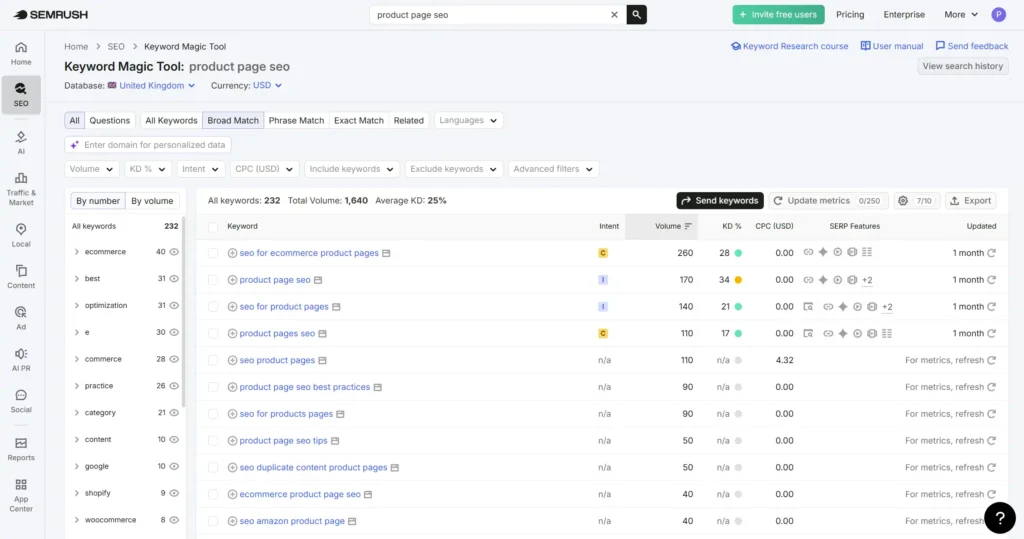
Once you have your list of potential keywords, plug them into a tool like SEMrush or Ahrefs. This gives you search volume data – how many times a month people are actually searching for that phrase.
Here is where a lot of people panic. You type in “Waterproof Saturn Jacket 10001 with fur collar” and the tool comes back with zero. Do not let that put you off. These tools do not capture every variant, every niche phrase, every product-specific search. Zero does not mean nobody is searching for it.
The more important question is whether you can realistically rank for it.
If your site has authority behind it – decent backlinks, age, a track record of ranking – you can afford to target broader terms with real search volume. Go for “waterproof jacket with fur collar” and compete for that traffic.
If your site is newer, do not waste time chasing terms that established retailers have locked up. Go longer. Chase the specific phrases. They are easier to rank for, and the people searching them know exactly what they want.
URL Structure
Your product page URL should be clean, short and readable. If someone looks at the link before clicking it, they should instantly understand what the page is about.
Keep everything lowercase. Use hyphens to separate words, never underscores. And keep it as short as possible while still being descriptive.
Using our Saturn Jacket example, a good URL looks like this:
yourstore.com/jackets/waterproof-saturn-jacket
A bad URL looks like this:
yourstore.com/products/The_Saturn_1000123?ref=123
Nobody wants to click that. More importantly, nobody trusts it.
Your URL should reflect your site structure too. The category before the product slug tells both Google and the visitor where they are in your store. Keep that hierarchy consistent across every product page.
One more rule – once a URL is live and indexed, do not change it without setting up a 301 redirect. Changing URLs on live pages throws away whatever authority they have built up. If you delete a URL, you could lose links it has aquired and this will impact your Domain Authority. If you use Ahrefs this is also called Domain Rating on the platform.
Meta Titles, Meta Descriptions and H1
These three elements are among the most important on any product page. Get them right and you are sending clear signals to search engines about exactly what the page is about.
Meta Title
Front load your target keyword. Put it at the start of the title, not buried at the end. After the keyword, add your brand name or even the product brand itself. For example:
“Waterproof Saturn Jacket with Fur Collar | Frankenstein Outdoor”
Search engines and users both read left to right. The keyword needs to be the first thing they see.
Meta Description
Google overwrites meta descriptions roughly 70% of the time, pulling its own snippet from your page content instead. Write one anyway. Make sure your target keyword is in there because when Google does show it and someone searches that phrase, the keyword gets bolded in the results. That bold text catches the eye and improves click through rate.
H1
Simple rule. Your H1 is your target keyword. Not a clever variation, not a marketing headline. The keyword. One H1 per page, and it should match the intent of everything that follows.
One rule that applies across all three – never use the same meta title or H1 on another page of your site. Duplicate titles and headings confuse search engines and split your ranking potential. Every page competes on its own terms.
Unique Product Descriptions
This is where most ecommerce stores fall down, and it is entirely avoidable.
When a new product comes in, the supplier sends a description with it. It is tempting to copy it straight onto the page and move on. The problem is every other retailer selling that product is doing exactly the same thing. You end up with identical content across dozens of sites, and Google has no reason to rank yours above anyone else.
The process is straightforward. Read the supplier description to understand the product. Then search your target keyword and read what the top ranking competitors have written. Get a feel for the language, the depth, what they cover and what they miss.
Then close it all and write your own.
Not a rewrite. Not a paraphrase. Your own description, in your own words, that covers the product accurately and completely. This is what Google wants to see and more importantly it is what your customer needs to make a buying decision.
A word of caution on AI generated descriptions. Tools like ChatGPT can produce product descriptions quickly and at scale. The risk is that stores are using them without any human review, publishing hundreds of thin, generic descriptions that all sound the same.
Google is getting better at identifying this content and it can do more harm than good. If you use AI as a starting point, treat it as a first draft that needs a human to make it specific, accurate and on brand before it goes live.
Unique content is not just good SEO practice. It is the core of the page and will help you convert more customers if well written, informational and persuasive.
Images, File Size and Alt Text
Images are one of the most overlooked elements of product page SEO, and they affect both your rankings and your conversion rate.
Every product image should be saved as a WebP file and kept under 100kb.
If you are working with large files from a photographer or supplier, run them through Squoosh. It is free, browser based, and will compress your images without a noticeable drop in quality for most products.
The exception is high end products. If you are selling a ring at £100,000, a heavily compressed image could undermine the perceived value of what you are selling. In that case it is a trade off between page speed and presentation.
Check your analytics, see what percentage of your visitors are on mobile, and make a decision based on that. Most ecommerce stores skew heavily mobile, so speed should win in the majority of cases. But use your judgement.
File Names
Before you upload an image, look at what it is called. Most cameras and phones produce file names like IMG_4872.jpg or DSC_0023.jpg. These mean nothing to Google.
Rename your images before uploading them. Write the file name like you are describing the image to a child. For our jacket it would be something like waterproof-saturn-jacket-blue-fur-collar.webp.
Lowercase, hyphens between words not underscores, no symbols, no random numbers. Simple and descriptive.
Google reads file names as a signal of what the image contains. It takes seconds to rename a file and most stores never bother.
Alt Text
Alt text exists for screen readers. Write it as if you are describing the image to someone who cannot see it. Keep it plain, descriptive and clear. No symbols, no keyword stuffing, no clever formatting. Just an honest description of what is in the image.
A good rule of thumb – if a child could not understand it, rewrite it.
User Experience on Product Pages
SEO gets people to your page. User experience determines what happens next.
A product page that is difficult to read, cluttered or confusing will lose the sale regardless of how well it ranks. Google also pays attention to how users behave on your pages. If people land and leave immediately, that is a signal that the page is not delivering what they came for.
Keep the language simple. Write for a low reading age. That is not about dumbing things down, it is about respecting your customer’s time. Nobody visits a product page to decode complex sentences. They want to know what the product is, whether it is right for them, and how to buy it.
Use bullet points to break up key product details. Dimensions, materials, compatibility, included accessories – anything that a customer might scan for before committing. Walls of text get skipped. Short, scannable points get read.
Font size matters. Anything under 16px on body text is too small, particularly on mobile. If a user has to pinch and zoom to read your product description you have already lost them.
Contrast matters too. Dark text on a light background, or light text on a dark background. Never grey text on a white background or any combination that makes the user work to read it.
Be mindful of pop-ups. A pop-up that fires the moment a visitor lands on your product page interrupts the very journey you want them to take. If you use them, delay them. On high value products, an aggressive pop-up can be the reason someone leaves without buying.
And check your pages on a real phone. Not just a browser emulator. Tap the buttons, scroll the page, go through the purchase journey yourself. You will spot issues no audit tool will catch.
Specifications, Delivery and Returns
These sections can an afterthought on a lot of ecommerce stores.
They should not be.
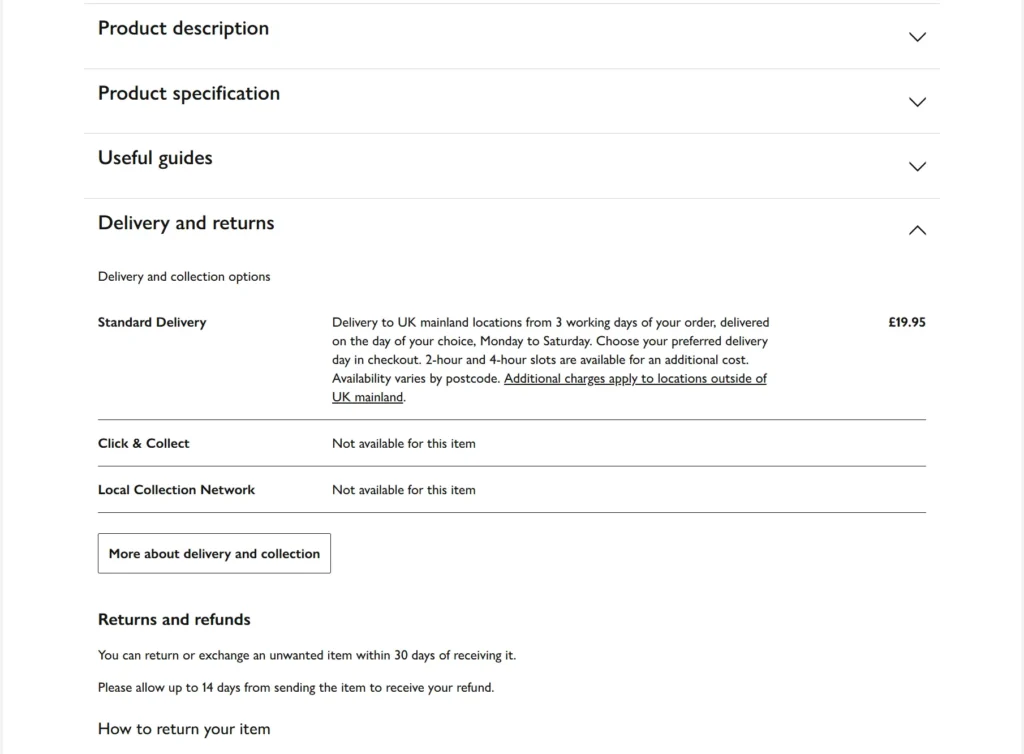
Google wants to see pages that cover a topic comprehensively. A product page that describes the item but leaves the customer guessing about dimensions, materials, delivery times or return policies is an incomplete page. Incomplete pages do not rank as well as pages that answer every question a buyer might have before they have to ask it.
Think about what your customer needs to know before they commit to a purchase. Specifications answer whether the product is right for them. Delivery answers when they will get it. Returns answer what happens if it is not what they expected. These are not admin details, they are buying decisions.
Leaving this information off your product page does not just hurt your SEO. It kills conversion. A customer who cannot find the returns policy will not risk the purchase. A customer who cannot find the dimensions will buy from a competitor who listed them.
Put specifications on every product page where they are relevant. Dimensions, weight, materials, compatibility, power requirements, whatever applies to what you sell. Make delivery timeframes clear and specific. And make your returns policy easy to find, easy to understand and written in plain English.
Cover the full picture and you serve both Google and your customer at the same time.
Dwell Time and Interactivity
Dwell time is how long a visitor spends on your page before going back to Google. The longer they stay, the stronger the signal that your page delivered what they were looking for. It is not a direct ranking factor Google has confirmed, but the behaviour it represents absolutely influences how your pages are evaluated over time.
Interactivity is one of the most effective ways to increase dwell time on a product page, and most stores ignore it entirely.
Video is the most impactful. A product video showing the Saturn Jacket being worn in real conditions, demonstrating the waterproofing, showing how the fur collar sits – that keeps a visitor on the page far longer than a static image ever will. YouTube hosted videos embedded on your product page also bring their own search visibility benefits.
Colour and variant selectors that update the product image in real time are another strong signal. When a user clicks blue and the jacket changes to blue, they are interacting with your page. That click, that moment of engagement, is registered. It tells Google this page is doing its job.
Product configurators take this further. If you sell something that can be customised – accessories added, components swapped, finishes chosen – and the visitor can visualise those changes in real time, you have built something genuinely valuable. A user spending four minutes configuring a product is sending an exceptionally strong engagement signal.
Size guides, 360 degree image rotations, zoom functionality, fit calculators – all of these serve the same purpose. They answer questions the visitor has without them needing to leave the page to find the answer elsewhere.
Every second a visitor spends engaging with your product page is a second they are not on a competitor’s.
The Biggest Product Page Problem Nobody Talks About
Every point in this guide means nothing if the person adding your products to the website has not been briefed properly.
This is one of the most common and most damaging problems we see in ecommerce SEO. A business owner has a new product arrive, hands it to a staff member and says “get that on the site.” That staff member has no SEO training, no process to follow and no understanding of why any of this matters. They add the title, upload the images, copy the supplier description and move on to the next task.
Nobody told them to rename the image files. Nobody explained what alt text is or why it exists. Nobody mentioned canonicals, or that deleting a product page with backlinks pointing to it can damage the whole site. Nobody showed them how interactivity affects how long people stay on the page, or that the words in the product description directly affect whether the page ever gets found in the first place.
This is not a criticism of the staff member. It is a process problem.
The businesses that get product page SEO right are the ones that have turned it into a repeatable process. Every new product follows the same steps before it goes live. Keyword research first. Unique description written. Images renamed, compressed and alt text added. Meta title front loaded with the target keyword. Canonical checked on variants. Internal links considered.
That process does not require an SEO expert to execute once it is documented. It requires someone who has been shown what to do and why it matters.
If your current process is “add it and hope for the best” then the technical and content advice in this guide will only ever be partially applied. The biggest SEO gains in ecommerce often come not from finding new tactics but from consistently executing the basics every single time a product goes live.
What is your product page traffic actually worth?
Enter your current numbers and see what better product page SEO could mean for your revenue.
You currently have 5,000 monthly visitors generating around £4,875 per month. To double that to £9,750 you can either double your traffic to 10,000 visitors, or double your conversion rate from 1.5% to 3.0%. Both routes achieve the same result. Investing in product page SEO is the most cost effective way to get there.
Schema Markup
Schema markup is code that sits behind your product page and tells search engines exactly what they are looking at. It does not directly improve your rankings but it can significantly improve your click through rate, which over time does influence where you appear.
For product pages there are two types worth implementing.
Product Schema
Product schema tells Google the name, description, price, availability and brand of what you are selling. When implemented correctly this can trigger rich results in the search listings – pricing and availability shown directly in Google before a user even clicks. In a list of ten results, the one showing a price and an in stock label stands out. That is what schema does for you.
Review Schema
Review schema pulls your product ratings into the search results as star ratings. A listing showing four and a half stars out of five gets clicked more than a listing showing nothing. It is that simple. Trust is established before the user reaches your page.
One important note. Google has tightened its guidelines on review schema significantly. The reviews must be genuine, must be on your own site, and must relate specifically to the product on that page. Do not aggregate reviews from third party platforms and pass them off as your own. Google will catch it and the rich result will be removed.
Both schema types are supported natively on Shopify and WooCommerce through plugins and theme settings. On Magento it requires more deliberate implementation but the principles are the same.
Get it right and your listing does more selling before the click even happens.
Trust Signals
A visitor who does not trust your store will not buy from it, and a visitor who leaves immediately without engaging is a negative signal for your rankings.
Trust is built through design, messaging and iconography working together. A clean, professional layout tells the visitor subconsciously that you are a legitimate business. Sloppy design, inconsistent fonts and cluttered pages do the opposite.
Iconography does a lot of heavy lifting here. Padlock icons near payment fields, delivery van icons with clear timeframes, return arrows with your returns policy summarised in one line – these are visual cues that answer the three questions every online shopper has before they commit. Is this site safe? Will my order arrive? What happens if it goes wrong?
Accreditations and trust badges matter too. Industry memberships, verified review platform logos, payment provider logos. If you have won awards or been featured in recognised publications, put them on your product pages.
Messaging plays its part as well. “Free returns within 30 days” in plain English next to the add to cart button removes a barrier to purchase at the most critical moment. That one line can be the difference between a sale and a bounce.
A user who trusts your page stays longer, engages more and converts. All of that feeds back into your SEO performance.
Customer Reviews and User Generated Content
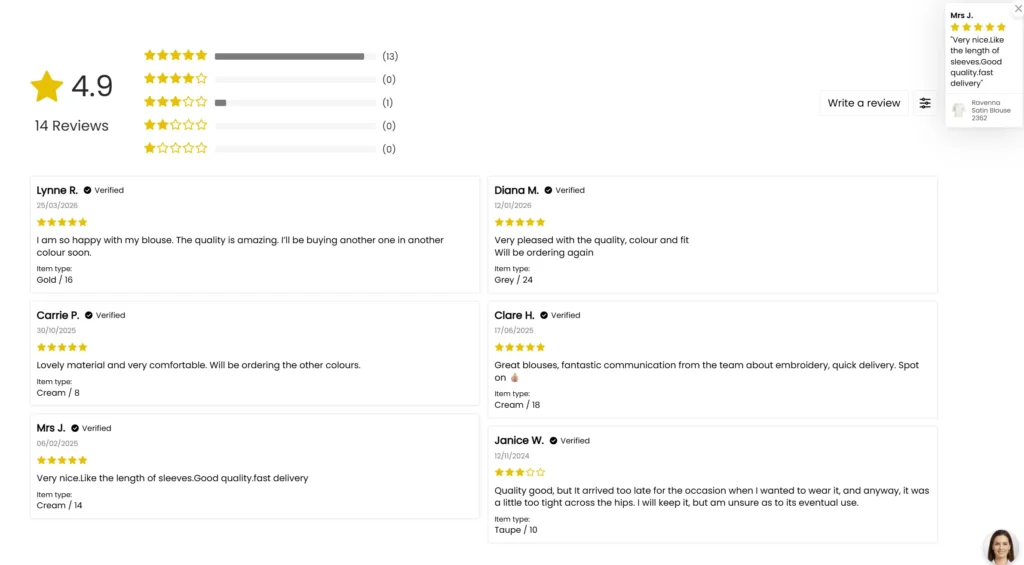
User generated content is any content that your customers create for you. Reviews are the most common form and they are one of the most valuable things you can add to a product page.
Every review that gets posted adds unique, keyword rich content to your page that you did not have to write. A customer describing the Saturn Jacket as “perfect for walking in the Lake District in November” is adding natural language that mirrors how real people search. Google sees fresh, relevant content being added to the page on a regular basis and that is a positive signal.
From a conversion perspective the numbers are straightforward. People trust other people more than they trust brands. A product page with 47 genuine reviews converts better than one with none, regardless of how well written your description is.
Encourage reviews actively. Email customers after purchase with a direct link to leave a review. Make it as frictionless as possible.
Q&A and FAQ Sections
A Q&A section on a product page does two things well. It puts more relevant keywords on the page through the natural language of real customer questions, and it builds trust by showing that other people had the same concerns and got answers.
FAQ sections serve a similar purpose but give you more control over the content. Think about the questions your customers ask before they buy – about sizing, materials, compatibility, delivery, returns – and answer them directly on the page.
Both are increasingly valuable for AI search results. Tools like ChatGPT and Google’s AI overviews pull answers from pages that are structured clearly around questions and answers. A well structured FAQ on your product page increases the chance of your content being surfaced in those results.
Mark both up with FAQ schema where possible. It gives you the best chance of appearing in rich results and AI generated answers.
Page Speed
A slow product page loses customers before they have read a single word. Mobile users in particular will not wait. If your page takes more than a couple of seconds to load, a significant percentage of your visitors will leave before it finishes. That lost traffic is lost revenue.
Google also uses page speed as a ranking signal. A page that is unusable on mobile will not be rewarded in search results.
The tools to test your speed are free and easy to use. Google’s own Core Web Vitals report in Search Console shows how your pages are performing in the real world across real users. PageSpeed Insights gives you a score and a breakdown of what is slowing you down. GTmetrix and Pingdom Tools both offer detailed waterfall reports that show exactly which elements are loading slowly and in what order.
A word on Core Web Vitals specifically. They matter and are worth monitoring, but they are not the hard ranking factor some people make them out to be. A page that passes Core Web Vitals is not guaranteed to rank, and a page that marginally fails is not automatically penalised. Focus on making your pages genuinely fast for real users and the metrics will follow.
The most common culprits on product pages are uncompressed images, poorly implemented third party scripts and bloated themes. Fix those three and you will see the biggest gains.
Breadcrumb Navigation
Breadcrumbs are the navigational trail that sits near the top of a page, showing a visitor exactly where they are within your site structure. You have seen them a thousand times:
Home > Jackets > Waterproof Jackets > Saturn Jacket
They serve two purposes. For the visitor, they make it easy to navigate back up to a category without hitting the back button. For Google, they are a clear signal of your site hierarchy and how your pages relate to each other.
From an SEO perspective breadcrumbs add relevant internal links to every product page automatically. Every level of that trail is a clickable link passing authority back up through your category structure.
Make sure your breadcrumbs reflect your actual URL structure. If the trail says one thing and the URL says another, you are sending mixed signals to search engines.
The final step is marking your breadcrumbs up with schema. Breadcrumb schema tells Google exactly what that trail represents, and it can result in your breadcrumb path showing in the search results themselves rather than just the URL. It is a small detail that makes your listing look more structured and trustworthy than a competitor who has not bothered.
On Shopify and WooCommerce breadcrumbs are available through theme settings or plugins. On Magento they are typically built into the theme but worth auditing to make sure the schema is implemented correctly.
Related Products
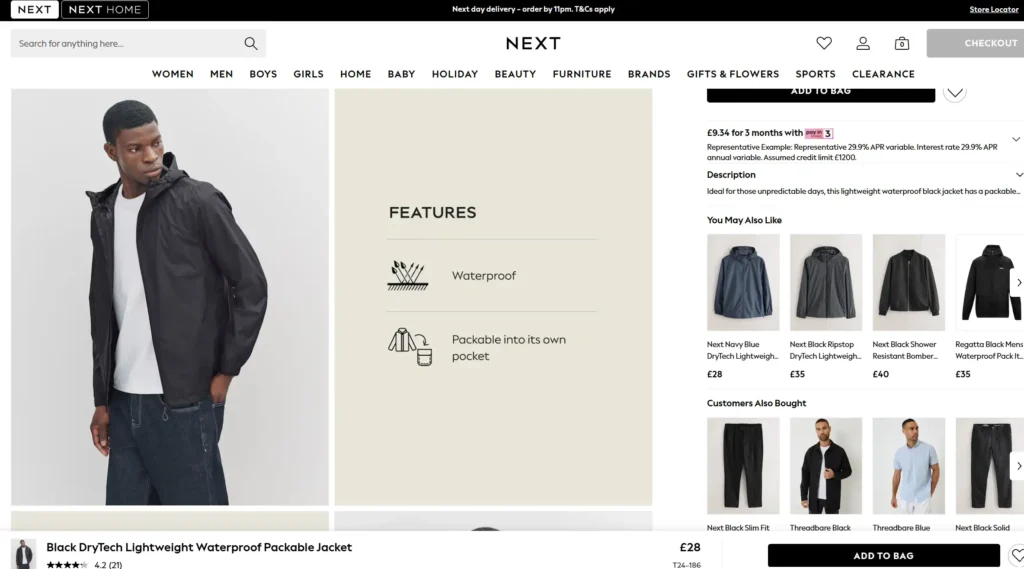
Related products are often treated as a conversion feature and nothing more. They are that, but they are also one of the most underused internal linking tools on an ecommerce site.
Every time you display a related product, you are creating an internal link. That link passes authority from the page the visitor is on to the product being recommended. Do that consistently across hundreds of product pages and you have built a powerful internal linking structure without any manual effort.
It works the other way too. If product A links to product B, and product B links back to product A, both pages benefit. The authority flows between them and Google sees a well connected, relevant site structure rather than a collection of isolated pages.
From a conversion perspective the logic is simple. A visitor who is not quite sold on the product they are looking at has two options – go back to the category page or leave entirely. Related products give them a third option. Stay on your site and look at something else. That reduces bounce rate, increases time on site, and gives you another shot at the sale.
Keep your related products genuinely relevant. A customer looking at a waterproof jacket should see other waterproof jackets, or complementary products like walking boots or base layers. Showing random products from unrelated categories defeats the purpose for both the visitor and Google.
On Shopify this is handled automatically through the theme or apps like LimeSpot and Frequently Bought Together. On WooCommerce the related products feature is built in. On Magento it requires configuration but the functionality is native to the platform.
XML Sitemaps
An XML sitemap is a file that lists every important page on your website and submits it to Google for crawling. Think of it as handing Google a map of your store rather than making it find its own way around.
For product pages this matters because Google discovers new and updated pages faster when they are in your sitemap. If you add a new product and it is not in the sitemap, you are relying on Google finding it through internal links alone. That can take time.
The good news is that if you are running Shopify, your XML sitemap is generated and updated automatically. Every time you add a product it gets included without you doing a thing. If you are on WordPress with Yoast SEO installed, the same applies – Yoast handles sitemap generation and keeps it current as your product catalogue changes.
On Magento it requires more deliberate configuration, but once set up it works the same way. And yes I still say Magento instead of Adobe Commerce, much in the same way I still say Marathon over Snickers. It’s the same thing.
Once your sitemap is live, submit it to Google Search Console under the Sitemaps section. This tells Google exactly where to find it and allows you to monitor how many of your pages have been indexed versus submitted. If you are submitting 500 product pages and Google has only indexed 200, that is a signal worth investigating.
One rule – only include pages you want indexed in your sitemap. Discontinued products you have noindexed, thin pages, duplicate content – keep those out. Your sitemap should be a list of your best pages, not every URL your site has ever generated.
Canonical Tags on Product Variants
If you sell a product that comes in multiple variants – different sizes, colours, materials – there is a good chance your ecommerce platform is creating a separate URL for each one. A blue Saturn Jacket and a red Saturn Jacket might both have their own page, with near identical content sitting on each.
From a user perspective that makes sense. From a search engine perspective it is a problem. Google sees two pages saying almost exactly the same thing and has to decide which one to rank. More often than not it ranks neither particularly well, and in some cases the duplicate content can dilute the authority of both pages.
The solution is a canonical tag. It is a small piece of code that sits in the header of your variant pages and points back to the main product page. It is essentially telling Google – this page exists, but this is not the version I want you to index. Look at the main page instead.
This consolidates all of the ranking signals – links, content, authority – into one page rather than splitting them across multiple URLs that are all saying the same thing.
On Shopify this is handled automatically to a degree, but it is worth checking. On Magento and WooCommerce it typically requires more deliberate configuration. Either way it is not something to leave to chance.
Get your canonicals right and you protect your product pages from competing with themselves.
Orphan Pages
An orphan page is a page on your website that no other page links to. It sits in isolation, with no internal links pointing towards it. Search engines find pages by following links. If no links lead to a page, Google may never find it, and if it does find it, it has no context for how important that page is relative to the rest of your site.
For ecommerce stores this is more common than you might think. Products get added in a hurry, categories get restructured, old pages get forgotten. Over time you can end up with dozens of product pages that are effectively invisible, not just to Google but to your own customers.
The impact goes beyond individual pages. Internal links are how authority flows around your website. A strong homepage passes authority to category pages, which pass it to product pages. Orphan pages sit outside that flow entirely. They receive nothing and contribute nothing.
Finding orphan pages is straightforward. Crawl your site with a tool like Screaming Frog and cross reference the results against your XML sitemap. Any URL in your sitemap that receives no internal links is an orphan.
The fix is equally straightforward. Link to the page from a relevant category, a related product, or a content page. One link is enough to bring it into the fold.
Good website structure means every page has a place in the hierarchy and authority flows where you want it to go. Orphan pages are a sign that structure has been neglected and they are worth cleaning up.
Handling Discontinued Products
This is where a lot of ecommerce stores quietly damage their own SEO without realising it. A product gets discontinued, someone deletes the page, and overnight you have lost whatever authority and backlinks that page had built up.
Before you do anything with a discontinued product page, check two things. Does it have backlinks from external sites? And does it still receive traffic? Both of these tell you the page has value worth preserving.
If the product has a direct replacement, a 301 redirect to the replacement product is the right move regardless of SEO performance, as it is also the best experience for the customer.
If there is no direct replacement, your options depend on the data. If search interest is still high, keep the page live, allow Google to index it, and offer similar product suggestions. Be clear that the product is discontinued – do not leave users staring at an out of stock button with no explanation.
When traffic starts to taper off, noindex the page but keep it on the site while continuing to show similar alternatives. When interest disappears entirely, redirect to the closest category page.
What you should never do is simply delete the page without checking its value first. If you 404 a page, any link equity from external or internal links is lost, undoing whatever SEO value the page had earned.
Your instinct to redirect is right. Just make sure you are redirecting to something relevant. A redirect to your homepage because there is nothing else to point to passes minimal value and frustrates users. The closest category is always a better destination than the homepage.
Pro Tip: Link From Your Homepage
Your homepage carries more authority than any other page on your site. It collects the most backlinks, the most traffic and the most trust signals. Every internal link from your homepage passes a portion of that authority to the destination page.
If you have a product or category that you want to rank, find a way to link to it from your homepage. A featured products section, a best sellers row, a curated picks block – the format does not matter. The link does.
It is one of the simplest and most overlooked ways to give a page a ranking boost without building a single backlink.
The Work Does Not Stop After Publishing
Publishing a fully optimised product page is the end of the beginning, not the finish.
Give the page a month to settle. Google needs time to crawl, index and assess it. Once that time has passed, open Google Search Console and look at what keywords the page is ranking for. You will often find terms you did not explicitly target, phrases Google has associated with your page based on the content you wrote.
Go through those keywords carefully. If a phrase is driving impressions or clicks and it is not on the page, add it. Work it into the description, the specifications, the alt text – wherever it fits naturally.
You are not stuffing keywords, you are aligning your content with what Google has already decided the page is about.
Then check your positions. If you are ranking in positions six to twenty for a term with real search volume, that page is close. A content improvement, an additional internal link or a more targeted title tag could be enough to push it into the top five.
This process never really ends. Search trends shift, competitors update their pages, new variants appear. The stores that win in organic search are not the ones that optimise once. They are the ones that treat their product pages as living documents and keep improving them.
Check. Improve. Repeat.