
Ecommerce Commercial Intelligence
Frankenstein Commercial Intelligence shows your real margins, where competitors undercut you and which ads are losing you money. Then it lets you reprice products or pull them from your ads in one click.
We specialise in integrated ecommerce solutions. Below, you can try a live demo based on a tool we built for one of our ecommerce clients.
Your numbers are in five different places
Your supplier costs are in spreadsheets. Your prices are in Shopify. Your ad spend metrics are in Google Ads. Your competitors’ prices are on their websites. Your feed problems are buried in Merchant Center.
So the questions that matter most, like which products actually make money, where you’re being undercut and which ads are wasting budget, take an afternoon of exports and spreadsheets to answer.
Most weeks, nobody has that afternoon.
Our commercial intelligence suite pulls all this data into one place and lets you act on it there and then, not just report on it.
Things to try in the demo
The demo uses Northfold Beds, a made-up bed retailer. Every figure is fictional, so click anything you like.
Open Competitor Benchmark and reprice a product to match the competitor. Watch the margin update before you commit.
Type a silly price into the reprice box and see the warning.
Open Worst Performers and exclude a product from Shopping.
Compare Ads conversion value with website revenue in All Products.
Run the AI report and read what it says needs fixing.
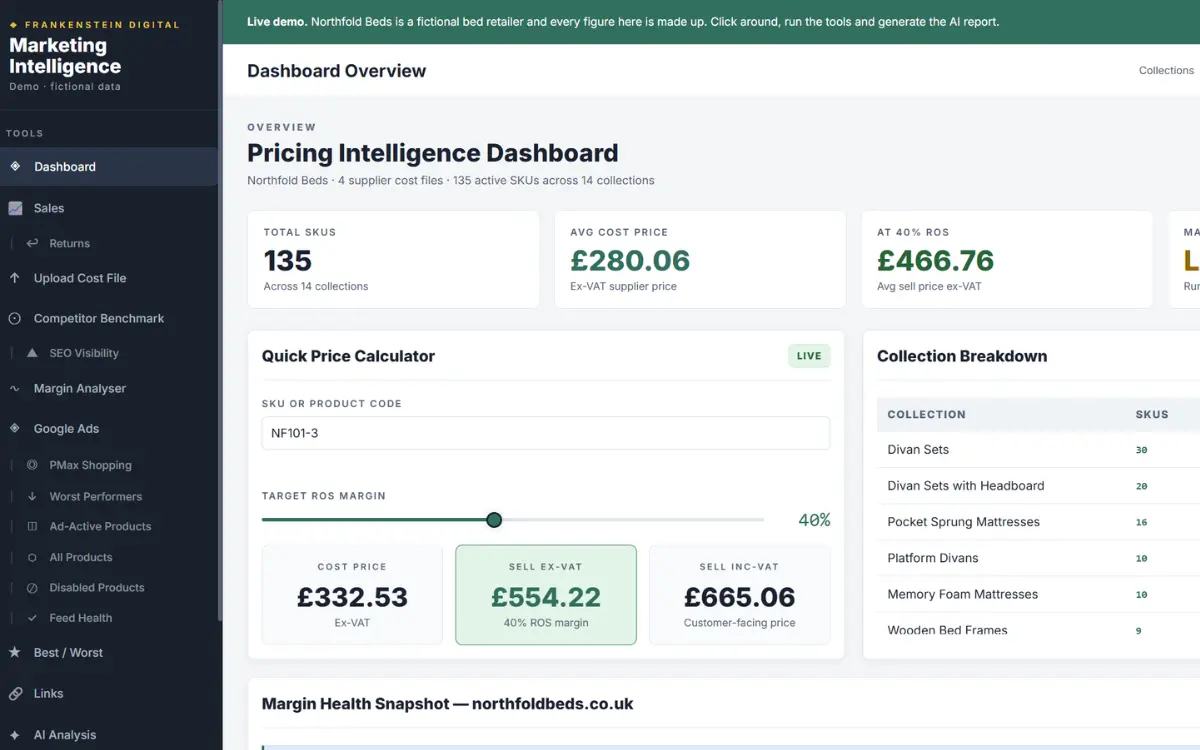
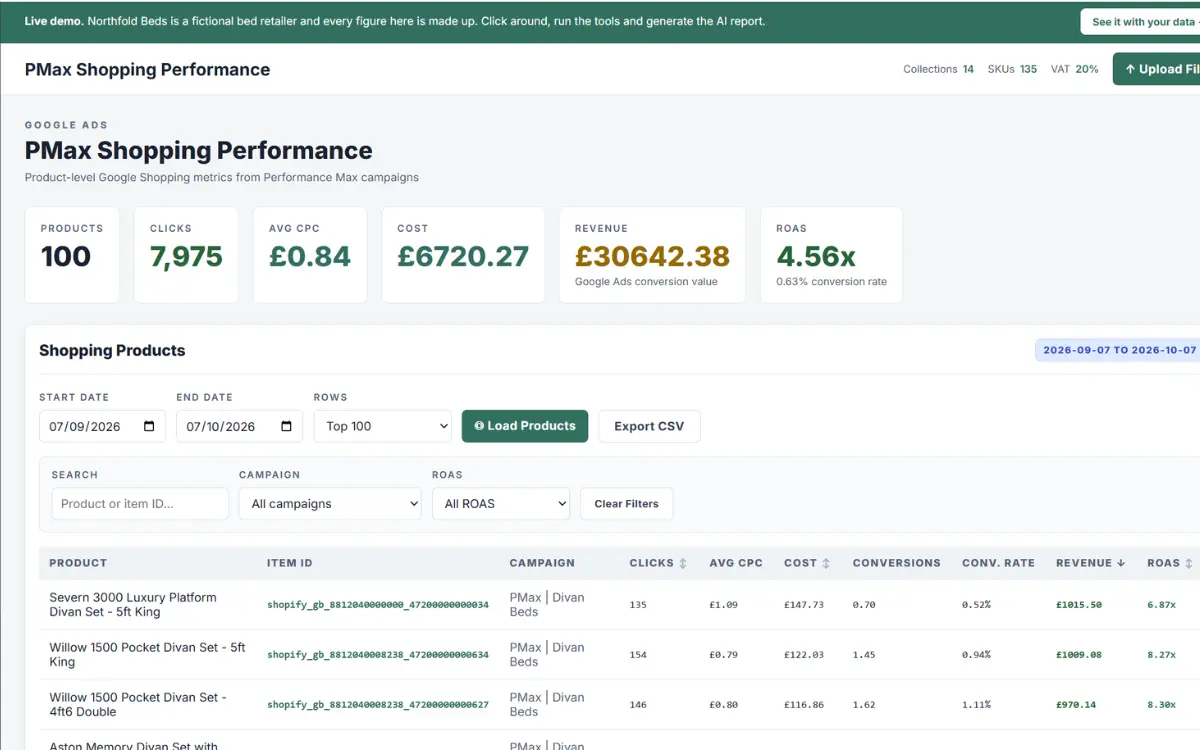
No sign-up needed. Demo data only.
Check competitor prices and reprice in one click
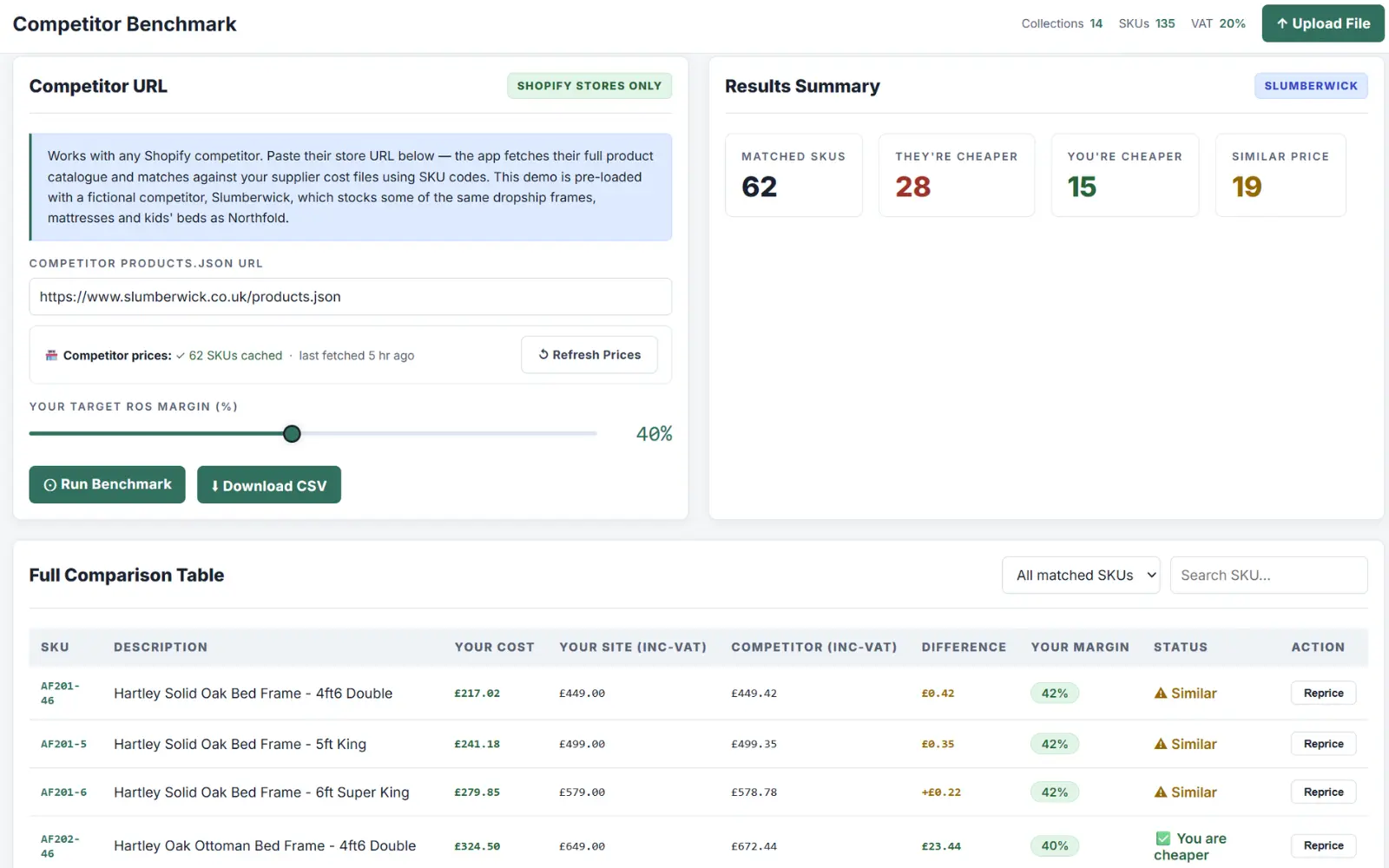
One feature of the tool is price matching against your main competitor if they sell the same products. Paste a competitor’s Shopify store, and we match their catalogue against yours by SKU or product name. You can see where they’re cheaper, where you’re cheaper and where you’re level.
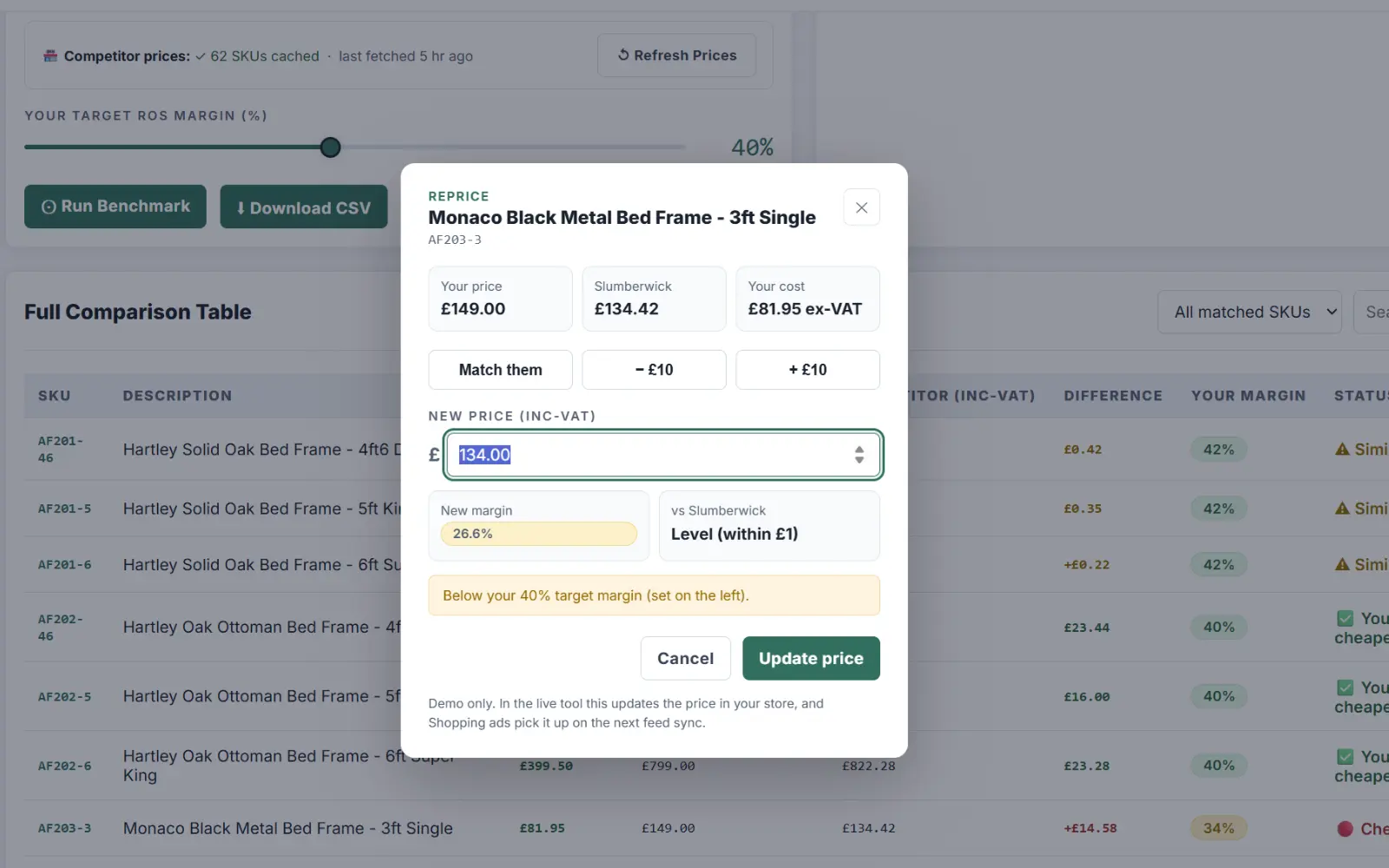
Click reprice, and you’ll see your price, their price, your cost and your new margin before anything changes. It’s colour-coded, so the margin shows green, amber or red depending on whether it’s at an acceptable level.
Once you’re happy with the new price, press update and it changes the price on your website through an API connection.
This takes hours out of benchmarking competitor prices against your own, and it’s just one feature in our developing tool.
01Compare prices
02Reprice in one click
Google Ads only tells you what it thinks it sold
When you use Google Ads, it can credit the sale value to the product someone clicked in Google Shopping, not the product they actually bought on your website.
We put Google’s conversion value next to your real website sales, product by product, so you can see which products drive sales, and which sell well with hardly any ad support.
Those are opportunities. We know the products are popular, but are we shouting about them enough?
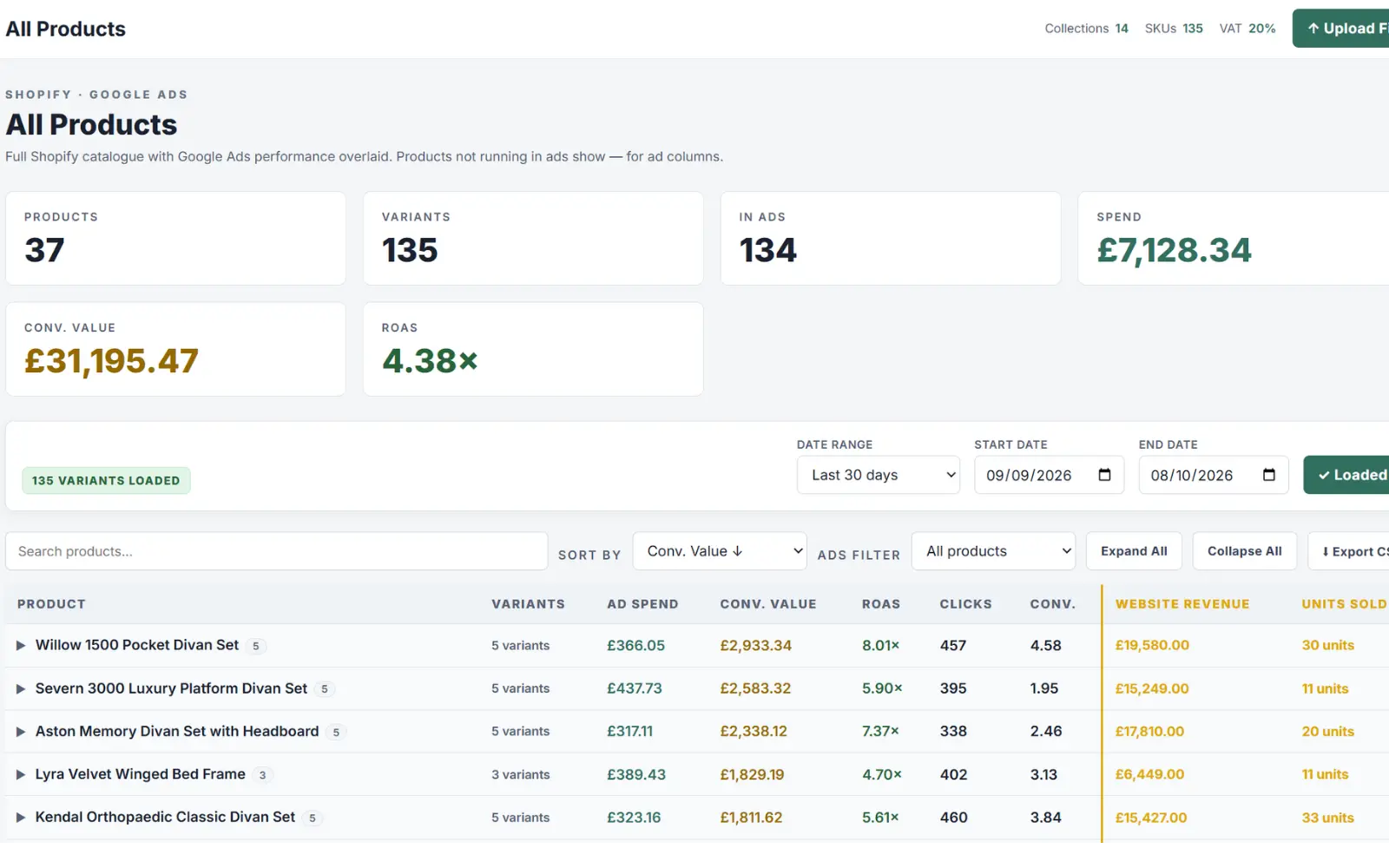
Ads value and real sales rarely match
Someone clicks an ad for one bed and buys another. Google credits the one they clicked. Side by side, you can see which products really sell, and which are quietly doing well on their own.
Example: Harlow 1000 Divan Set
Pull poor performers from Shopping in one click
Our Commercial Intelligence tool lets you pull poorly performing products from your Performance Max or Google Shopping campaigns with one click.
Spot one you want to stop, press exclude, and it’s pulled from your Performance Max and Shopping campaigns. It stays in your store and your Merchant Centre feed, so it can still sell through other channels. It just stops spending your ad budget.
You no longer have to depend on an agency like us to show you which products are performing and which aren’t. You can see it clearly for yourself in the dashboard.
The dashboard also features a handy top 10 best and worst products by revenue from your Shopping campaigns, so you can quickly pinpoint the products working for you, and those working against your target ROAS.
All paused
£294.49 a month back in your budget, and every product is still live in your store.
Real Results. Local Businesses.
Ecommerce brands we've helped grow through connected SEO, PPC, development, and automation.
Company
From Liverpool Supplier to One of the UK's Leading Workwear Brands
How we grew Work Uniform Company's monthly revenue by 900%, fully automated their order processing through supplier APIs, and took them to the top of Google for competitive terms like "work shirts" and "womens work trousers" on the Shopify platform.
Direct
Scaling Organic Traffic for Liverpool's Largest Bed Retailer
How we helped Bed Factory Direct, a Liverpool-based bed manufacturer and retailer with over 37 years in business, increase organic visibility and drive ecommerce revenue through a connected SEO and development strategy.
Driving Ecommerce Revenue for Liverpool's Iconic Home Store
How we helped Taskers, an established Liverpool home and furniture retailer with over 60 years of history grow their online revenue through an integrated approach spanning SEO, development, and ecommerce optimisation.
Keep your Shopping feed healthy
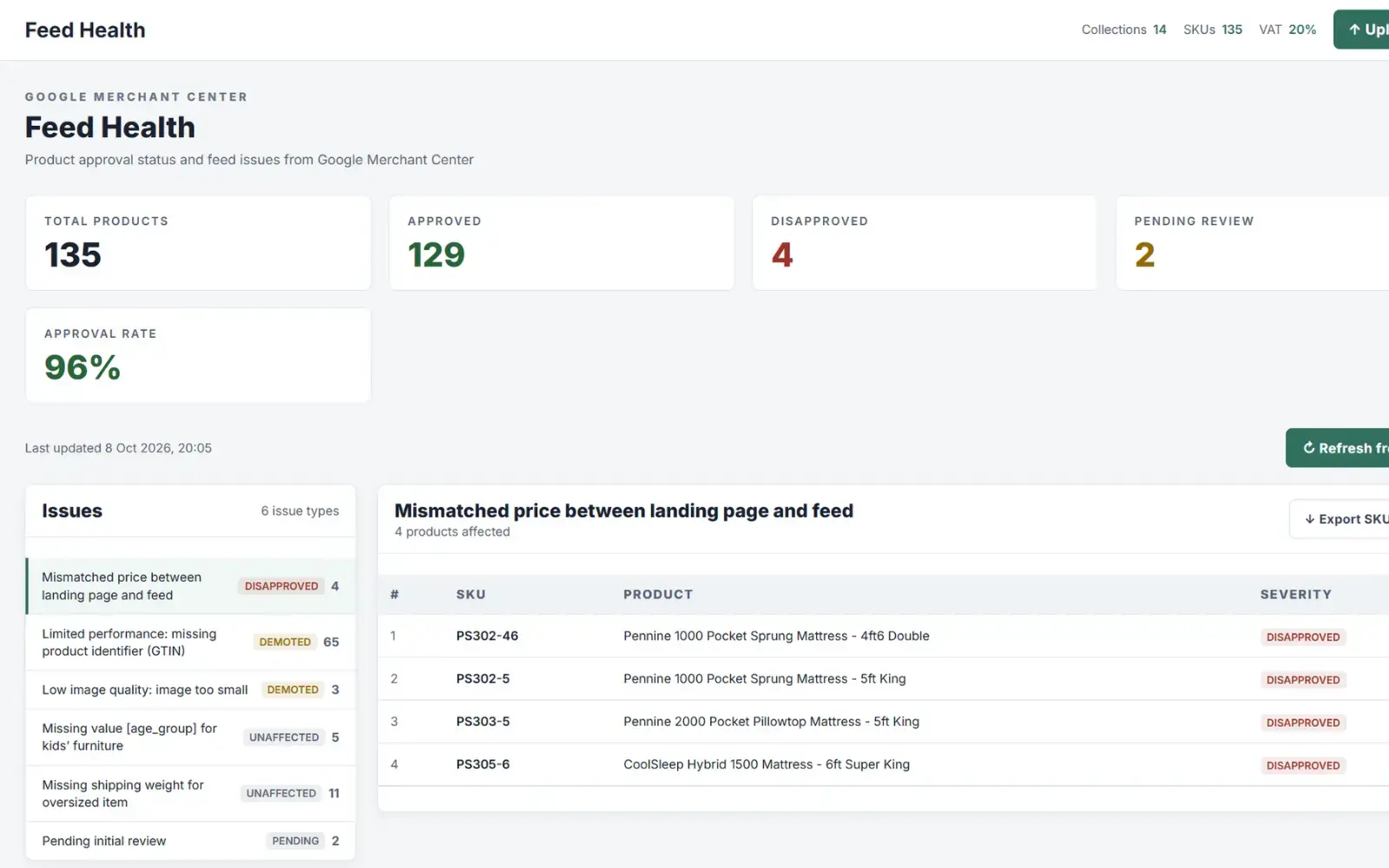
See your Merchant Center approval rate, every disapproved or demoted product, and why. Spot price mismatches and missing details before they cost you sales.
As a busy store owner, you may not be familiar with the ins and outs of Google Merchant Center and Google Ads. This brings the important issues to light, so you know what needs acting on.
What the statuses actually mean
- Disapproved Not showing in Shopping at all. Usually a price mismatch or a policy problem. Fix these first.
- Demoted Still showing, but Google is holding it back. Missing details like a GTIN or a small image will cost you clicks.
- Unaffected A warning only. Worth tidying up, but it isn't hurting sales yet.








A report that joins the dots
Once a week, or whenever you like, AI reads all of it and writes you a plain-English report: what’s working, what needs attention and what to do in the next seven days.
It’s the bit no single tool can do. It’ll spot that a supplier’s cost rise has pushed products under your margin, that their prices haven’t been updated on the site, and that the mismatch has got them disapproved in Merchant Center. Three systems, one sentence, one fix.
AI reporting is often misunderstood. The AI doesn’t make up the numbers. Your data is stored in a database, the AI runs specific queries against it, and then explains what the answers mean. The figures come from your store, your ads and your supplier files. The AI just turns them into something you can act on.
This isn’t a plug and play tool. When you join Frankenstein Digital, we set it up around your business, with the rules that matter to you, like your margin targets, your key products and your suppliers.
Frequently Asked
Common questions about Commercial Intelligence.
No. Nothing changes until you press update, and you see your new margin before you do. If a price drops below your target margin, it warns you first.
Every product you exclude is listed in one place, with a button to switch it back on. Excluding a product only stops it showing in your Shopping ads. It stays in your store and your Merchant Center feed the whole time.
No. Your data is stored in a database, and the AI runs specific queries against it. Every figure in the report comes from your store, your ads and your supplier files. The AI explains what the numbers mean, it doesn't invent them.
You upload your supplier cost files and we match them to your products by SKU or product name. We set up the matching for you, even if every supplier sends a different format.
Competitor benchmarking currently works with competitors who run on Shopify. Paste their store address and we match their products against yours.
No. We set it up around your business, connecting your store, Google Ads, Merchant Center and supplier files, and adding the rules that matter to you, like your margin targets and key products.
Yes. Every dashboard is built around the business using it. If a data source has an API or can export a file, we can usually bring it in. That could be stock levels, your ERP, social media, marketplaces or anything else you need to see alongside your sales and ads.
It depends on the size of your catalogue and what you want connected. Book a walkthrough and we'll give you a straight answer.
Put your name in the book.
Tell us which parts aren't working. We'll reply within 24 hours, no hard sell.